
Blending out animations
Magic Blend Assets can automatically blend out when finished, similar to standard animations. This is especially useful for quick, one-off actions like weapon reloads or melee attacks. This is controlled by the Blend Out Type property: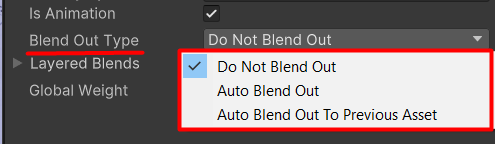
Blend Out Types for your Magic Blend Asset.
- Do Not Blend Out – Keeps the Magic Blend Asset active after the animation ends. Default setting. Use for base or idle poses (e.g., character holding a weapon).
- Auto Blend Out – Smoothly disables Magic Blending after the animation ends. Ideal when no blending is needed afterward.
- Auto Blend Out to Previous Asset – Transitions back to the last Magic Blend Asset after completion.
true:

Keep this on for fire&forget type of animations.