
Overview
Every weapon consists of two important parts:- Weapon Settings data asset: contains data (e.g. animations, weapon mesh).
- Weapon Base blueprint: executes gameplay logic (e.g. firing, reloading).
- Iterate over the TArray of Weapon Settings provided by the Character Settings.
- Instatiate a Weapon Blueprint specified in the Weapon Settings.
- Update the Weapon Settings variable of the newly instantiated weapon.
Weapon Settings
This data asset consists of 2 major categories:- Animation: properties related to the character and weapon animation.
- Gameplay: properties related to the weapon features (e.g. fire rate, ammo, etc.).
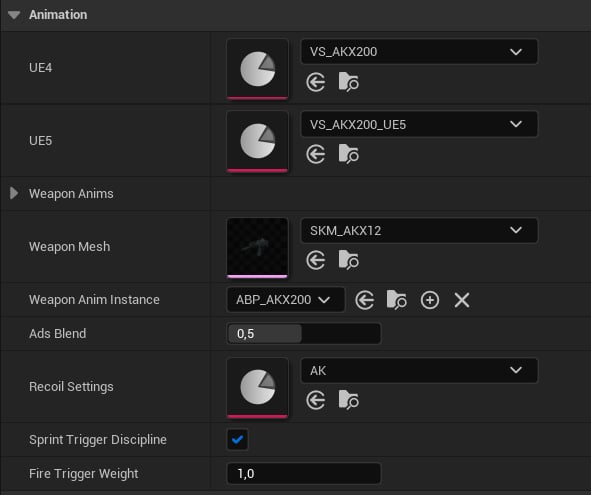
Animation group.
- UE4 and UE5 represent Viewmodel Settings for different Mannequin meshes.
- Weapon Anims: weapon animations Viewmodel Animations.
- Weapon Mesh: Skeletal Mesh of this weapon.
- Weapon Anim Instance: weapon animation blueprint.
- Ads Blend: blend between absolute and additive aiming.
- Recoil Settings: recoil animation settings.
- Sprint Trigger Discipline: whether to use trigger safety when sprinting.
- Fire Trigger Weight: weight of the finger rotation when firing.
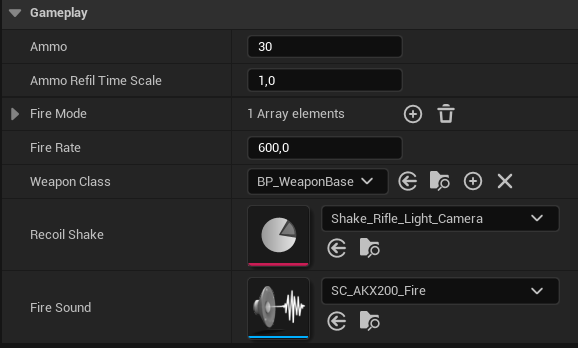
Gameplay properties.
- Ammo: ammo capacity of this weapon.
- Ammo Refil Time Scale: ammo will be refilled when the reload ends, but this time can be adjusted with this multiplier.
- Fire Mode: supported fire modes.
- Fire Rate: fire rate in rounds per minute.
- Weapon Class: Weapon Base blueprint class.
- Recoil Shake: camera shake asset.
- Fire Sound: this sound cue will be played when firing.
Weapon Blueprint
Weapons must have a runtime entity to run its logic like reloads or firing. This logic is implemented in blueprints derived from the Weapon Base class: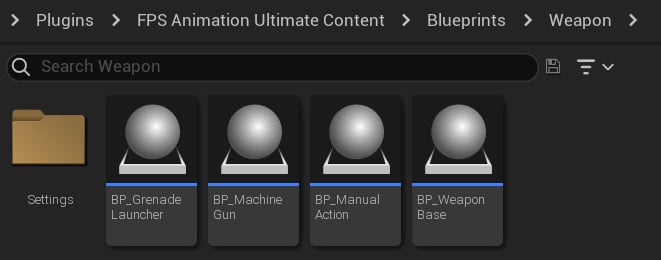
The plugin uses 4 main weapon types.
Equipping
When a weapon is equipped, it binds its functions to the BP_Viewmodel Dispatchers. So, when an input is triggered, a weapon function will be invoked: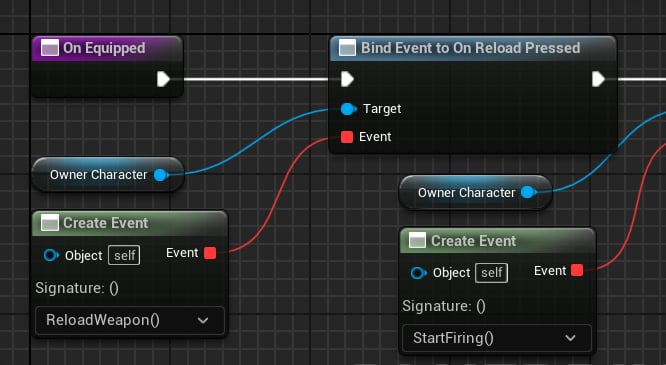
Reloading function binding.
Reloading
When a reloading function is called, the Weapon Base will play a reloading animation based on the left ammunition:- If there is no ammo, an empty reload will be played.
- If there is some ammo left, a tactical reload will be played.
- Play reload start animation.
- Play reload loop based on how many cartridges need to be inserted.
- Play reload stop to finalize the reload.
- Empty reload.
- Tactical reload.
- Less reload, when we have some guntape cartridges left.
Now that we are familiar with the gameplay logic, it is time to understand how animations work in the project.