
Overview
The Sci-Fi FPS Pack includes animated first-person arms, six weapon and item prefabs, character and weapon animations, procedural animation settings, recoil, sounds, visual effects, and a demo scene. Most content is inAssets/KINEMATION/SciFiFPSPack. The shared animation and gameplay scripts are in Assets/KINEMATION/Shared, and the recoil system is in Assets/KINEMATION/ProceduralRecoilAnimationSystem.
Try the demo
OpenSciFiFPSPack/DemoScene/Sci-Fi_FPS_Demo.unity and click Play. The scene lets you try the character controls and weapon animations together.
Use F to change items, the left mouse button to use an item, the right mouse button to aim, R to reload, and B to change fire mode. Character lists the controls and explains the code behind them.
Folder contents
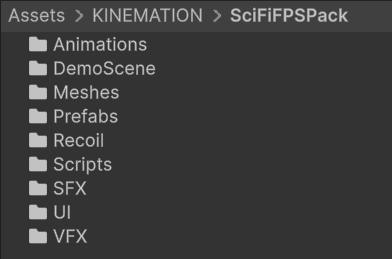
Open SciFiFPSPack to browse the included content.
Assets/KINEMATION/SciFiFPSPack.
The setup preset is
Scripts/Editor/SciFiGameplaySetupConfig.asset. It references the animation config, locomotion controller, Input Actions asset, starting items, and character sounds.
Shared systems
Gameplay Framework contains the animation controller, skeleton mapping, retargeting, Item View, camera, and basic character examples. Shooter Core adds weapon views, firearm examples, ADS, recoil application, and sway. The example usesShared/ShooterCore/Inputs_Shooter_Core.inputactions.
KAnimationCore contains common animation utilities and editor tools. Keep these shared folders with the pack; the pack’s components use them.
Weapons and items
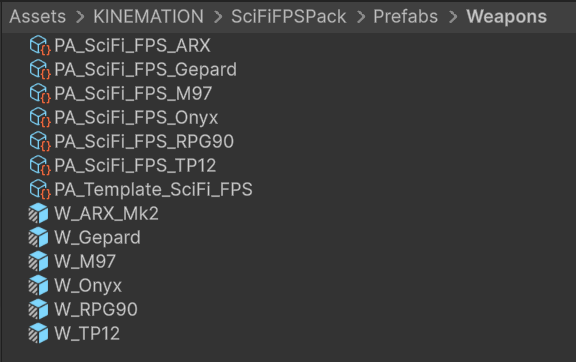
The weapon and item prefabs are in Prefabs/Weapons.
Each prefab already has its animation references and item components assigned. See Weapons for how each one works and which settings to change.
The Pack Setup item list can be a subset of the available prefabs. Add another prefab to Item Prefabs on the character controller when you want it in the character’s item cycle.
Animations
Animations is divided into ARX_Mk1, Gepard, M97, Onyx_Revolver, RPG90, TP12, and General. The ARX animation folder is named ARX_Mk1 even though the equipped prefab is W_ARX_Mk2.
Weapon folders group the character and item animations for actions such as idle, draw, holster, fire, reload, inspect, and aiming. Specialized items also contain charge, throw, or repeated reload animations.
General/Character/AC_FPS_SciFi.controller is the locomotion controller used by Pack Setup. Animations/Sci-Fi_FPS_Pack.asset is the animation config used by retargeting.
A clip stores the animated motion. A Gameplay Animation Asset stores that clip together with its mask, playback speed, and blending settings. Animation system explains how to edit and play them.
Procedural animation and effects
Prefabs/Weapons/PA_Template_SciFi_FPS.asset contains the common procedural features. The PA_SciFi_FPS_* assets set individual weapon poses and alignment. See Procedural animation for editing and runtime use.
VFX/Prefabs contains P_SciFi_MuzzleFlash, P_SciFi_MuzzleFlash_Gepard, and P_SciFi_LightningCharge. The lightning effect follows the charge weapon’s animated charge value. Recoil motion and camera shake are configured separately on each weapon.
Naming conventions
KINEMATION Unity content packs use the same asset prefixes. The prefix identifies the asset’s role; the remainder identifies the product, item, or action.
Use the prefix to find the asset type, then match the weapon and action names when assigning animation pairs.
For example, pair a character’s
A_FP_* action with the matching weapon’s A_W_* action on Item View. Use the PA_* asset to adjust that weapon’s idle pose and procedural motion.