
How the controller uses consumables
SurvivalPackController keeps food and medicine in Consumable Prefabs, separately from regular Item Prefabs. At startup, it creates each prefab below the character’s mapped weapon bone and hides it. Every entry in this list needs SurvivalConsumableExample and SurvivalConsumableView.
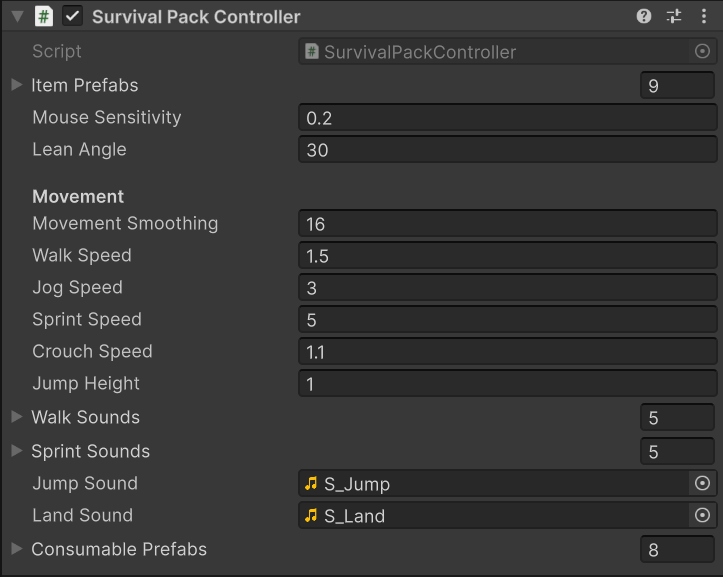
Food and medicine use the separate Consumable Prefabs list on the character controller.
OnUseConsumable. The controller ignores the request if another action is active, the index is outside the list, or the entry is missing.
- Stop aim and use on the active regular item, then play its holster animation.
- Wait for holster to finish and equip the selected consumable.
- Let
SurvivalConsumableViewplay the opening and repeated use animations.SurvivalConsumableExamplestores the returned duration asUnEquipDelay. - When that duration ends, holster the consumable.
- Hide it, reequip the previous regular item, and wait for its draw animation.
Food and medicine prefabs
The setup configuration assigns these entries in order. Their prefabs and procedural assets are inAssets/KINEMATION/SurvivalPack/Prefabs/Consumables.
Each pairs
SurvivalConsumableExample with SurvivalConsumableView. PA_SurvivalPack_<Item> selects its character idle pose and procedural settings. The view’s action pairs select opening, use, and holster animations.
Animation and repetition
SurvivalConsumableView extends SurvivalItemView. On equip, it runs the shared draw setup, resets the use counter and visible stage, and schedules the first use after the opening delay.
Draw can contain an opening animation, Use Animation contains the eating, drinking, or healing motion, and Holster puts the item away. Character and item sides play together where both are assigned. Bread’s use action is character-only; a tin can’s opening can also animate the item lid.
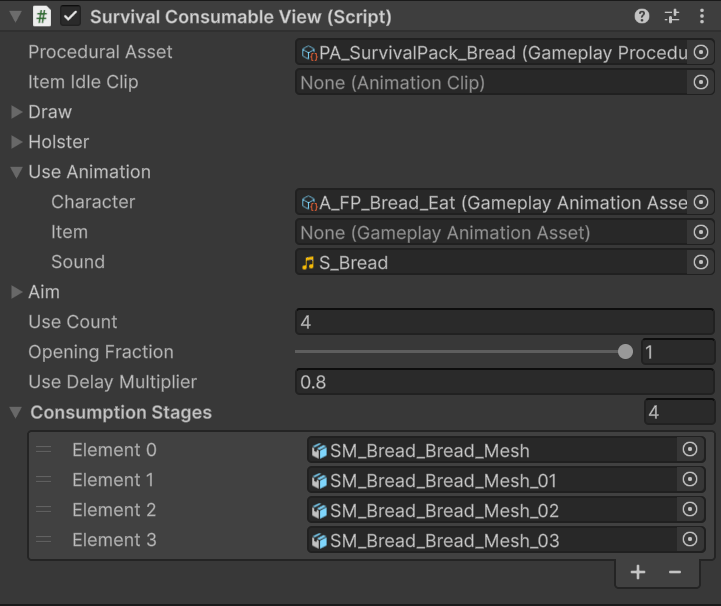
Bread uses four repeated eating actions and four visible mesh stages.
The opening delay is the draw duration multiplied by Opening Fraction. With a valid use animation, the returned sequence duration is
opening + useLength * (1 + useDelayMultiplier * (useCount - 1)), after clamping the count and delay to their valid ranges.
For example, bread uses four repetitions, Opening Fraction 1, and Use Delay Multiplier 0.8. The tin can uses three repetitions and an opening fraction of 0.85. These are prefab values, not shared defaults.
Consumption events and visible stages
The character use clips contain aUseConsumable event at the consumption moment. The callback follows this path:
SurvivalPackController.UseConsumable() → SurvivalConsumableExample.Consume() → SurvivalConsumableView.OnConsume().
OnConsume() advances the visible stage. Stage zero is shown on equip. Each event hides the previous entry and enables the next one; after the final entry, all stage objects are hidden.
Keep the event on the character animation, because the character controller receives it. Replacing a clip without this event leaves the visible food stage unchanged even though the controller still waits for the sequence duration.
To apply health, hunger, thirst, or inventory changes, extend SurvivalConsumableExample.Consume() and keep its base call so visual stages still advance. This callback can run several times during one sequence; choose whether your gameplay effect applies per bite or once per item.
Water bottle
Prefabs/Items/W_WaterBottle is a drinking item that stays in the regular Item Prefabs list. It uses GameplayItemExample and the base SurvivalItemView, rather than the timed consumable sequence above.
Its action pairs are:
Left-mouse use plays a sip and starts an action timer for its duration.
PA_SurvivalPack_WaterBottle controls the holding pose. Connect thirst or bottle-content changes in your own gameplay logic.
The pot also has a drinking action, but remains a tool with a lid-toggle secondary action.
Add or adapt a consumable
Duplicate a food or medicine prefab into your own folder. KeepSurvivalConsumableExample, its view, and the paired animation references. Assign a procedural pose, opening and use clips, repetition settings, and any visible stage meshes.
Add the prefab to Consumable Prefabs, preserve UseConsumable in the character use animation, and test the complete sequence. Check opening, every repeated use, stage changes, holster, and the return to the previous regular item.