
Character Clips
All camera animations are baked into character Animation Clips using thecamera_bone:
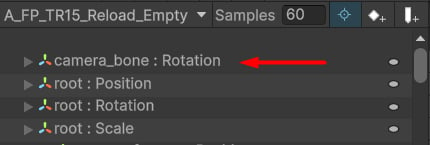
camera_bone example.
FPSCameraAnimator script.
FPS Camera Animator
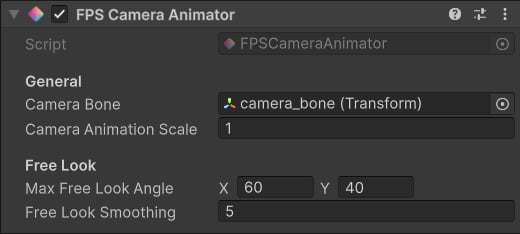
FPS Camera Animator component.
- Apply rotation and inputs.
- Apply camera shakes.
- Apply camera animations.
- Apply free look
- Camera Bone: this transform will be used to locally apply animation to the camera.
- Camera Animation Scale: this value will influence the camera motion.
- Max Free Look Angle: max yaw and pitch free look angle in degrees.
- Free Look Smoothing: interpolation speed when free look is active.
Camera Shakes
These are primarily used to animate camera when firing. To create a Camera Shake, right-click and selectKINEMATION/Shooter Core/Camera Shake:
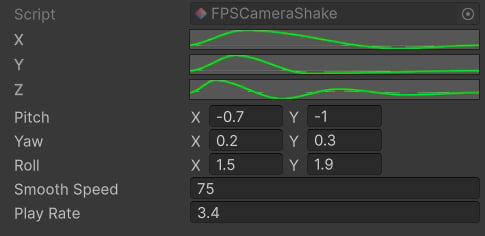
Camera Shake example.
- X/Y/Z: Animation Curves that animate a specific rotation axis.
- Pitch/Yaw/Roll: min and max pitch/yaw/roll value for this shake; when a shake is played, a random value will be selected from this range and multiplied by the curve animation.
- Smooth Speed: interpolation speed; if zero, no smoothing will be applied.
- Play Rate: playback speed multiplier.
Camera Shake Scriptable Object is used by the FPS Camera Animator script. Shakes are played using this method:
Free Look
This feature allows the player to view the surroundings by only rotating the camera. The code snippet below is an example of how you can activate the free look:-
The
ToggleFreeLookmethod activates and deactivates the feature. -
The
AddFreeLookInputmethod adds free look rotation to the camera, which is separated from the main input. -
UseFreeLookproperty helps you check if the free look is active or not.