
Tac Procedural Animation
This component is responsible for all procedural animation features in the pack, specifically:- Weapon sway
- Aiming
- Weapon and hands positioning
- Movement animations and recoil
- Spine rotation
- Pistol quick draw mechanic
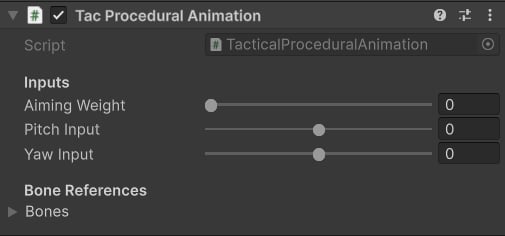
Procedural component.
- Aiming Weight: influence procedural aiming; if set to 1 - aiming will be fully applied, 0 - disabled completely.
- Pitch Input: look up angle.
- Yaw Input: look right/left angle.
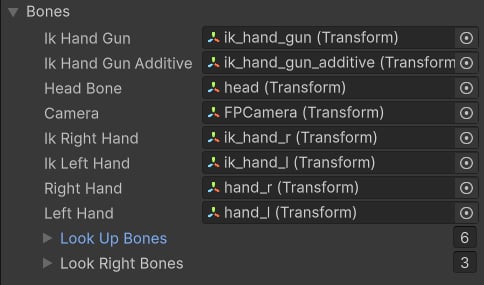
Skeleton bones.
- Look Up/Right Bones: contains spine bones to look up/right.
How to use it in code
The integration process involves updating input values of this component. We will use the TacticalShooterPlayer script as an example.Initialization
Add a new field of theTacticalProceduralAnimation type, and then initialize it on Start. The component does not require manual initialization, as it handles it under the hood.
Aiming
To make procedural aiming work, it’s essential to updateaimingWeight and aimPoint:
The aimingWeight is a value in range [0;1], make sure to smoothly interpolate it to 1 when aiming, and to zero when not.
It’s also important to provide the aimTransform - a KTransform (position & rotation) pose that represents aim point relative to the weapon transform. Here’s an example of how this value is computed in the pack:
Equipping a new weapon
TacticalProceduralAnimation component uses TacticalWeaponSettings (a Scriptable Object) as a data source. It is important to update these settings when a new weapon is equipped:Updating Inputs
To make the player look around and sway the weapon, make sure to update aim and move inputs:Pistol quick draw mechanic
In Tactical Shooter Pack, you can quick-draw a sideram while holding a rifle. The mechanic relies on the pistol (siderarm) pose relative to the right hand. To update such a pose, it’s important to use this method: ThegunRightHandPose field is a part of the TacticalShooterWeapon component:
When the game starts, every weapon will sample a base idle pose to compute the weapon pose relative to the right hand.
Playing IK Motions
IK Motion is a feature that allows you to play custom additive IK motions at runtime: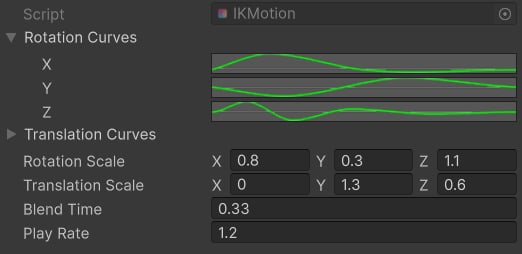
IK Motion example
- Rotation/Translation Curves: define motion for each translation and rotation axes.
- Rotation/Translation Scale: multipliers for each translation and rotation axes.
- Blend Time: blending in time in seconds.
- Play Rate: playback multiplier.