
Overview
The demo project provides a simple attachment system, which allows you to change them in realtime. Make sure to press the “I” key, and the attachment editing mode will be activated. At the current state it is possible to change 3 types of attachments:- Barrel-type attachments
- Grips
- Scopes
Attachment Prefabs
All attachments are located in the weapon prefab: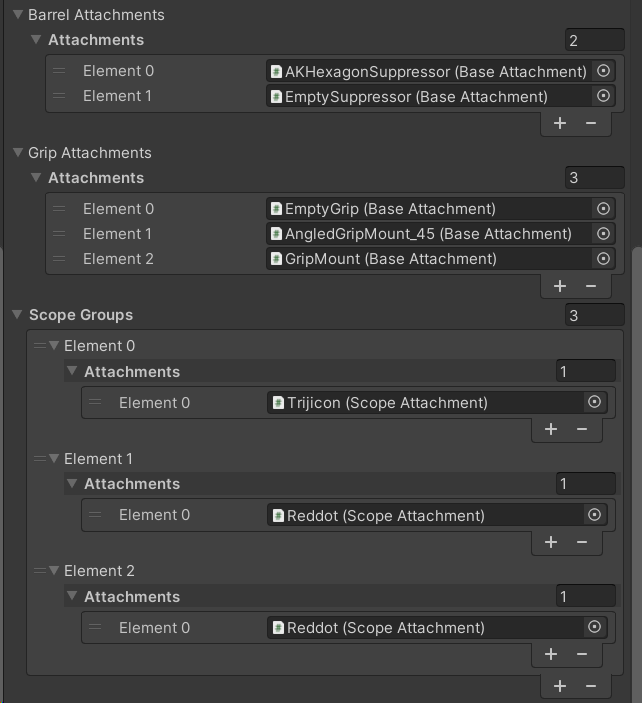
AK12 attachments example.
BaseAttachment, ScopeAttachment
All attachments are derived from the BaseAttachment class: attachmentLayerSettings deifne a list of animation features, which we want to link when the attachment is equipped. BaseAttachment is used for barrel and grip attachments, as these typically do not require that much logic. Scopes have their own attachment type: aimFovZoom will be multiplied by the default FOV when aiming. sensitivityMultiplier will scale the player input when aiming. aimPoint defines the active aim point socket.AttachmentGroup
AttachmentGroup represents a set of attachments, usually of the same type. This class is used to initialize, cycle and get the active attachment. This class is generic, meaning that you can use any BaseAttachment-derived type. This is a good foundation for custom attachment types.How to add attachments
The process is quite straightforward:- Add the attachment prefab to the weapon.
- Add the BaseAttachment or ScopeAttachment component to it.
- Then, based on the attachment type, add your attachment to the list.