
BP_Shooter_Weapon, but implements its own use and projectile-release events. The spear, knife, and axe derive from BP_Gameplay_Item and use their views for attacks and secondary actions.
Blueprint and settings pairs
Find the weapon Blueprints inSurvival_FPS_Pack/Blueprints/Items, with the spear in Throwables. Their views are in Views and their animation settings are in Settings.
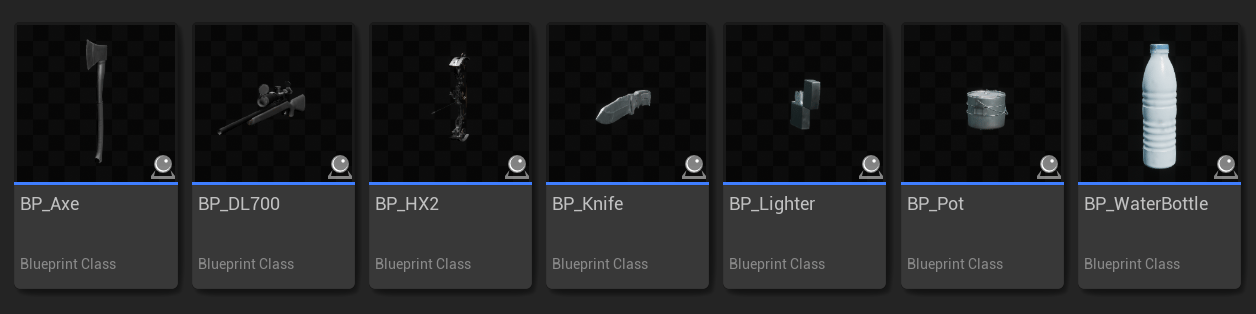
The regular item folder contains the hunting rifle, bow, knife, axe, and utility items. Spear and flare Blueprints are in Throwables.
DA_ asset through its animation settings reference.
Hunting rifle
BP_DL700 derives from BP_Shooter_Weapon. The gameplay Blueprint handles shot timing and ammunition. AC_DL700View extends the shared weapon view with the rifle’s animations and reload stages.
The view assigns DA_DL700, which references A_FP_DL700_Idle, ABP_Survival_FPS_Overlay, and ABP_Procedural_Survival_Weapon. Its recoil data is Blueprints/Recoil/DL700/RD_DL700, with Blueprints/Recoil/Shakes/Shake_DL700 for camera shake.
Montage setup
Character montages are inAnimations/Character/UE5/DL700; rifle montages are in Animations/Items/DL700. The corresponding UE4 character animations are in Animations/Character/UE4/DL700.
AC_DL700View has separate reload-start, reload-loop, and reload-end montage pairs. Its OnReload, OnReloadLoop, and OnReloadEnd functions connect those stages. Keep the character and rifle sides paired so the hands follow the bolt and ammunition.
The item sequence A_W_DL700_Reload_Loop uses BP_AnimNotify_ReloadWeapon to update ammunition at insertion. Preserve that notify when replacing the loop. Test both a partially loaded rifle and an empty rifle, and confirm that the reload ends when ammunition reaches capacity.
Aiming and scope
The view andDA_DL700 control aiming animation, sight alignment, camera FOV, and recoil presentation. The scope Blueprint is Blueprints/Items/Scope/BP_HuntingRifleScope.
When replacing the rifle mesh, check the scope’s aim point, paired bolt motion, and both hands. Change the settings asset for pose and motion; change the gameplay Blueprint’s Class Defaults for fire rate and ammunition.
HX2 bow
BP_HX2 uses AC_HX2View, DA_HX2, and the item Animation Blueprint Animations/Items/CompoundBow/ABP_W_HX2. It also implements BPI_Survival_Ranged for projectile release and selection.
Aim overlay
The character overlay isAnimations/Character/UE5/CompoundBow/ABP_Overlay_HX2. Its GameplayOverlay layer contains the BowStates state machine.
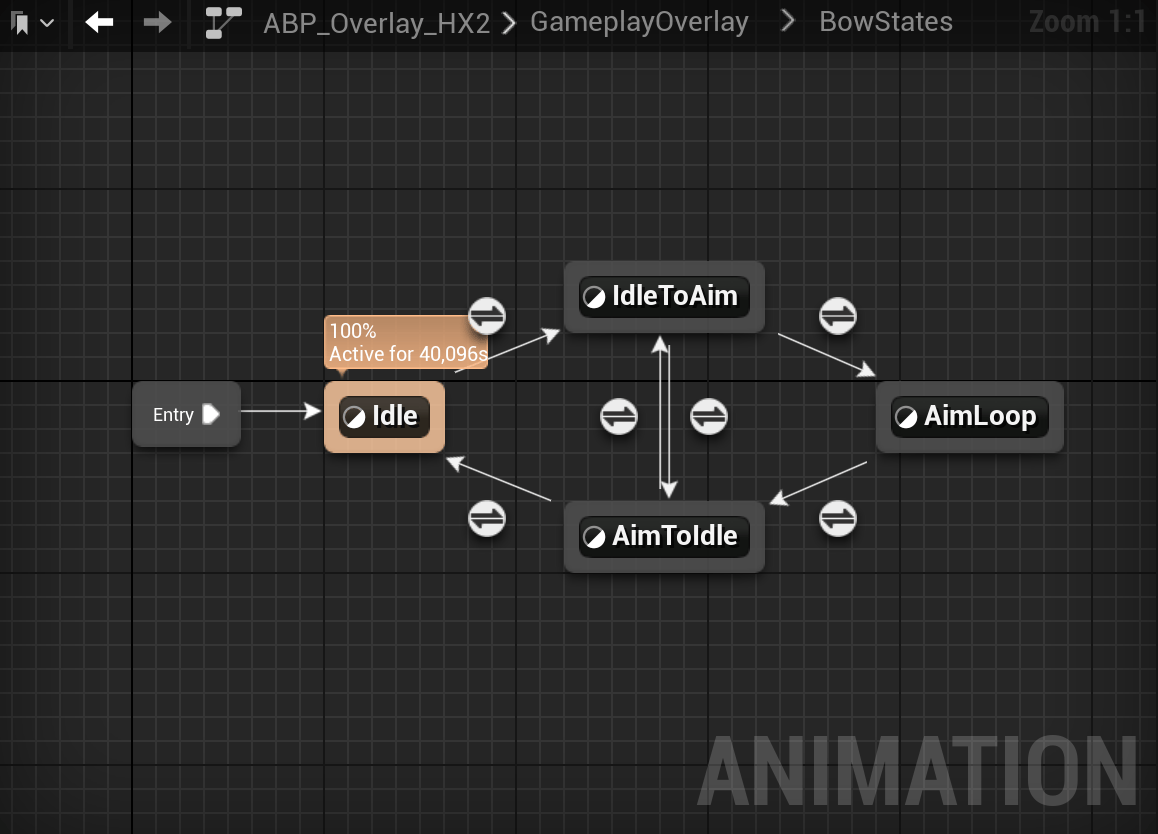
The bow overlay handles idle, drawing into aim, held aim, and lowering the bow.
DA_HX2. The view’s aim actions and the character’s aiming state must continue to drive this overlay when you replace the bow animation setup.
Character montages are in Animations/Character/UE5/CompoundBow. They include AM_FP_HX2_IdleToAim, AM_FP_HX2_Aim_Loop, AM_FP_HX2_AimToIdle, AM_FP_HX2_Fire, and the reload montages. The view also defines OnLoadNewArrow to load the next arrow.
The overlay’s event graph handles AnimNotify_OnBowAim and AnimNotify_OnBowCancelAim. Each event finds the equipped item’s mesh and plays the corresponding bow montage. Keep these animation events when replacing the draw and lower animations so the bowstring stays in step with the hands.
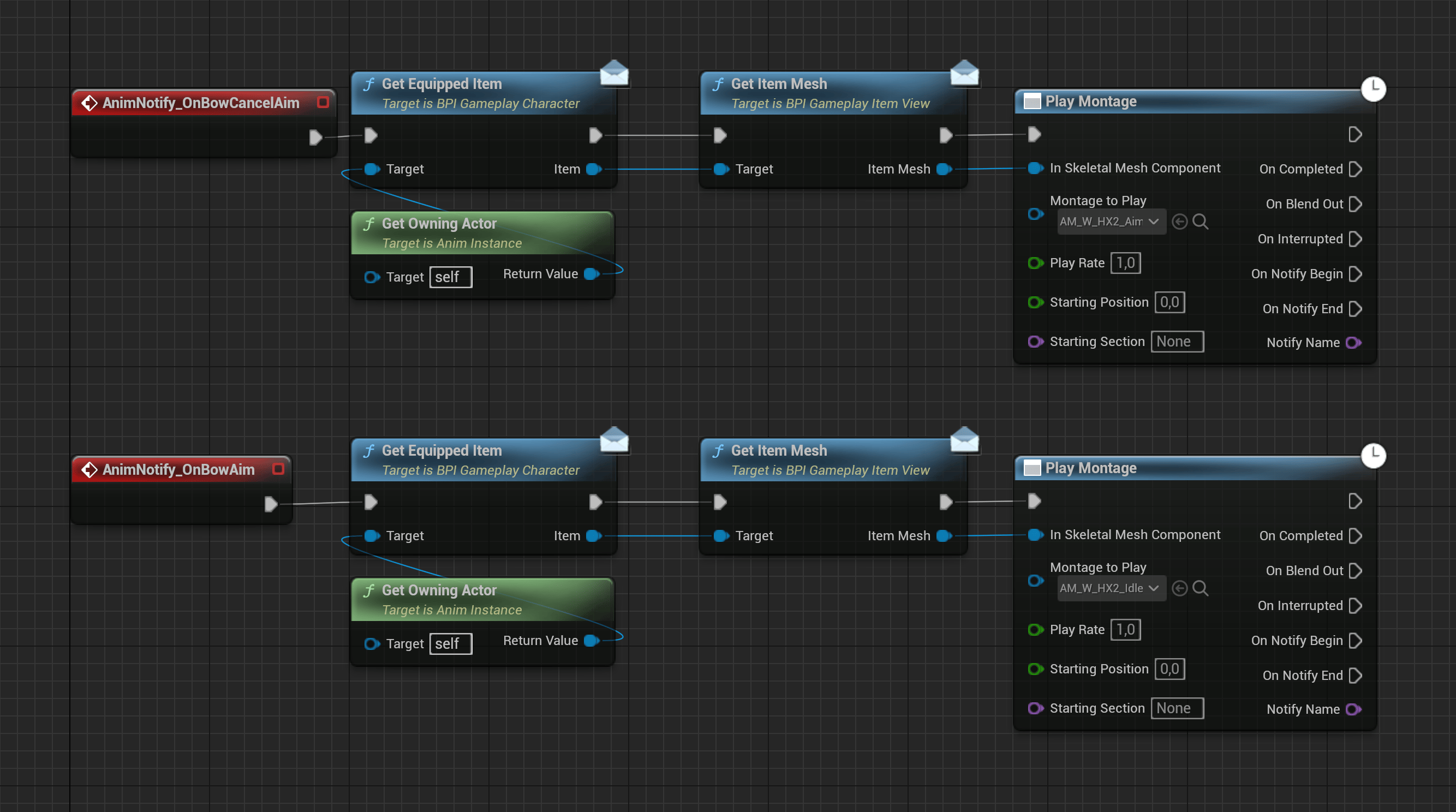
The HX2 overlay uses animation events to play the bow mesh's aim and idle transitions.
Arrow release
BP_HX2.OnThrowItem spawns BP_Survival_Projectile_Arrow at ArrowProjectileSocket on the bow mesh. It assigns the selected arrow model and launches along the socket’s right vector at speed 4000, with gravity scale 1.
Keep Launch Projectile at the character animation’s release frame. The notify calls OnThrowItem; the item’s use event separately waits for 0.3 × the use animation length before calling OnLoadNewArrow and starting that action.
Spear
Blueprints/Items/Throwables/BP_Spear uses AC_SpearView and DA_Spear. The view defines separate OnSpearAttack and OnThrowSpear actions.
Character animations are in Animations/Character/UE5/Spear. AM_FP_Spear_High_Idle_Attack and AM_FP_Spear_Low_Idle_Attack cover the attack poses. AM_FP_Spear_Throw_Release covers release, while the windup and loop sequences support throw preparation.
ABP_Overlay_Survival_Spear provides the spear overlay. Keep that layer connected through DA_Spear when changing grip or preparation poses. Use the attack montages for discrete strikes and the overlay for the continuous holding and preparation states.
The item implements BPI_Survival_Ranged and uses BP_Survival_Projectile_Spear. Preserve the projectile-release notify in replacement throw animations. The ranged component and interface live beside the spear Blueprint in Blueprints/Items/Throwables.
Knife
BP_Knife uses AC_KnifeView and DA_Knife. Its character actions are in Animations/Character/UE5/Knife, including AM_FP_Knife_Slash_Left, AM_FP_Knife_Slash_Right, draw, and holster montages.
Keep both slash actions assigned when adapting the view. The settings asset controls the resting pose and procedural alignment; the view controls the selected attack presentation. Connect hit detection and damage in your gameplay implementation at the contact moment.
Axe
BP_Axe uses AC_AxeView and DA_Axe. Character montages include AM_FP_Axe_Horizontal_Swing and AM_FP_Axe_Vertical_Swing in Animations/Character/UE5/Axe.
The same folder contains A_FP_Axe_Block and ABP_Overlay_Survival_Axe. Keep the block pose and overlay assigned when adapting the secondary action. Swing montages play the discrete attacks; the overlay controls the holding and block presentation.
The overlay reads IsAiming from AC_GameplayAnimation. It increases or decreases BlockProgress using BlockSpeed, clamps the result between 0 and 1, and eases that progress into BlockTime.
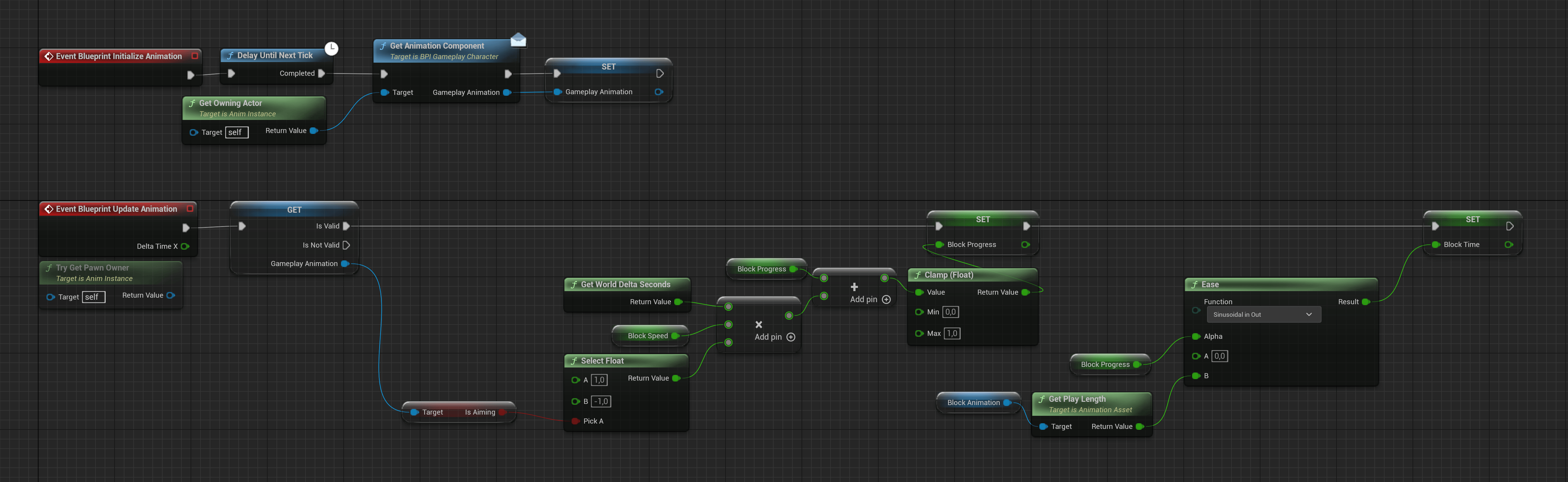
The axe overlay moves toward or away from the block pose according to IsAiming.
BlockAnimation at BlockTime. Adjust the animation for a different blocking pose, or BlockSpeed for a faster or slower transition.
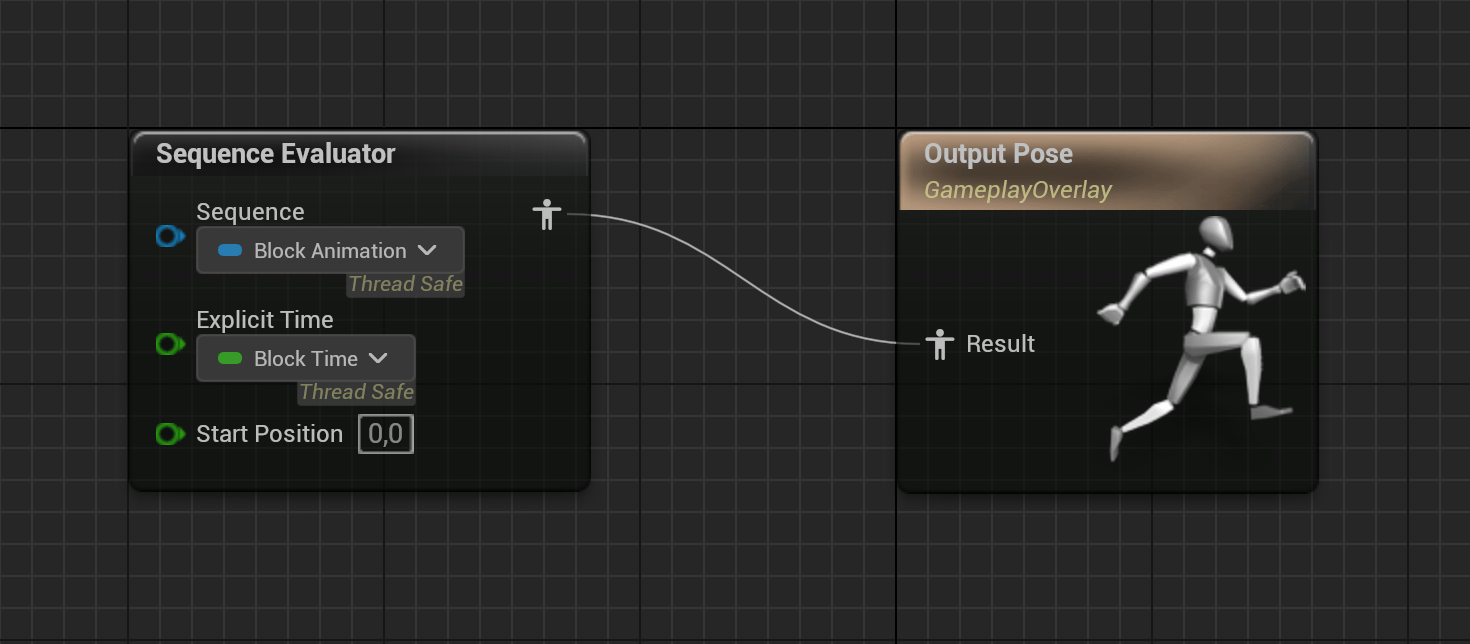
GameplayOverlay samples the block animation at the time calculated by the event graph.
Projectile assets and animation notifies
The shared ranged setup usesBPI_Survival_Ranged and AC_Survival_RangedWeapon in Blueprints/Items/Throwables. The spawned actors are in Blueprints/Projectiles:
BP_Survival_Projectileis the shared projectile base.BP_Survival_Projectile_Arrowis the arrow projectile.BP_Survival_Projectile_Spearis the spear projectile.BP_Survival_Flareis the flare projectile used by the signal flare tool.
Blueprints/Notifies/BP_AnimNotify_Survival_LaunchProjectile connects the character animation’s release frame to the ranged item. Keep this notify on the character side and retain the ranged interface when duplicating a projectile item.
Projectile mesh selection
AC_Survival_RangedWeapon holds ProjectileMeshes and ActiveMeshIndex. GetProjectileMesh returns the mesh at that index; CycleProjectiles advances the selection. The bow and spear update their held model after cycling and use the same selection for the spawned projectile.
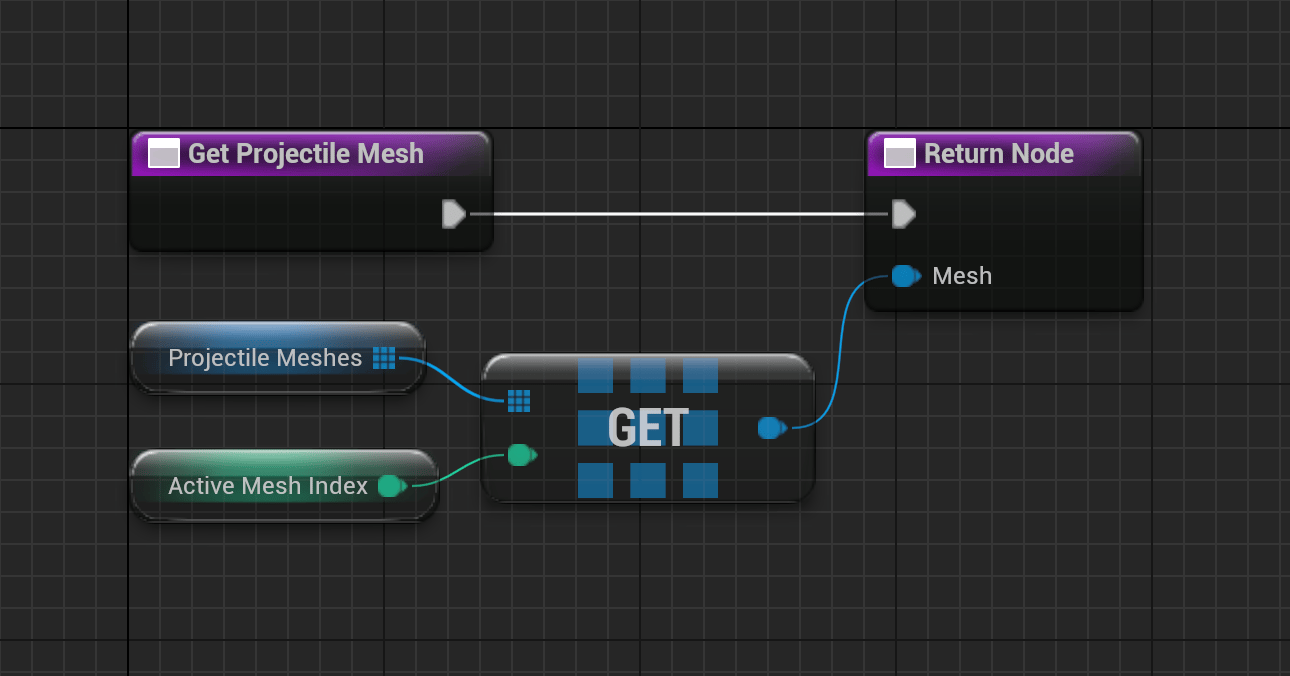
GetProjectileMesh returns the selected entry from ProjectileMeshes.
OnThrowItem chooses the projectile class and launch settings. Adding a mesh does not add a new projectile behavior.