Add to Your Character
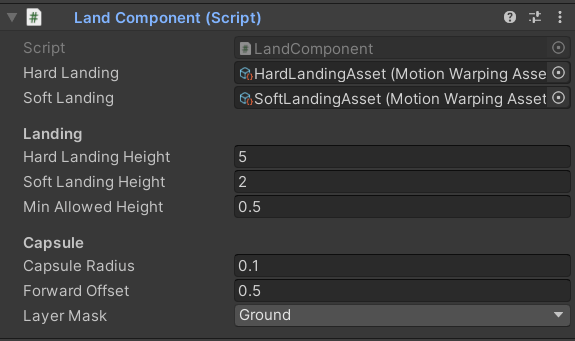
Attach the LandComponent directly to your character GameObject. Unlike other Motion Warping components, the Land Component does not use a separate Settings Data Asset — configure all properties directly in the component’s Inspector fields.Component Properties
Motion Warping Asset
required
The Motion Warping Asset played when the character lands from a high vertical velocity fall — typically a heavy impact with a recovery animation. This asset is selected when the fall height exceeds the Soft Landing Height threshold.
Motion Warping Asset
required
The Motion Warping Asset played when the character lands from a low vertical velocity fall — a gentle, controlled touchdown. This asset is selected when the fall height is between Min Allowed Height and Soft Landing Height.
float
required
The maximum fall height that the hard landing asset supports. Falls exceeding this value will not trigger a landing interaction at all. Use this as an upper safety bound to prevent the warp from running on unsurvivable drops.
float
required
The fall height threshold that switches between soft and hard landing assets. If the character’s vertical fall distance is greater than this value, the Hard Landing asset is used. If it is at or below this value, the Soft Landing asset is used.
float
required
The minimum fall height required to trigger any landing interaction. Falls shorter than this value are ignored and no warp is initiated, allowing normal locomotion to handle small drops naturally.
float
required
The radius of the capsule trace cast downward to locate the landing surface. Tune this to match your character’s foot or body width so the trace accurately represents the landing footprint.
float
required
A forward distance offset applied to the detected landing point. Adjust this to shift where the character touches down relative to the ground contact position, accounting for momentum carried during the fall.
LayerMask
required
Defines which collision layers the component considers when raycasting for the ground. Set this to include your terrain, floor, and platform layers.
How It Works
When the Land Component is active, it continuously casts a raycast downward from the character to check for a grounded surface below. Once a valid ground hit is found within the allowed height range, the system selects the appropriate landing asset and initiates the interaction automatically.1
Detect the Ground
The component fires a downward raycast (using Capsule Radius and Layer Mask) to find a potential landing surface. The vertical distance to the hit point is measured and compared against Min Allowed Height and Hard Landing Height to confirm the interaction is valid.
2
Select the Animation
The measured fall height is compared against Soft Landing Height. If it exceeds the threshold, the Hard Landing asset is chosen; otherwise the Soft Landing asset is used. The Forward Offset is applied to the detected ground point.
3
Initiate the Interaction
The system starts the warp interaction, driving the character’s root motion from its current airborne position to the calculated landing point with the selected Motion Warping Asset.
Triggering the Interaction
Get a reference to theLandComponent on your character, then call Interact on the MotionWarping component:
Motion Warping Asset Requirements
Landing carries the character from its current airborne position to a single ground contact point, so each landing asset needs exactly one Warp Phase.Both the Hard Landing and Soft Landing assets must each contain exactly 1 Warp Phase. The single phase maps the character’s root motion to the detected ground point returned by the downward raycast.