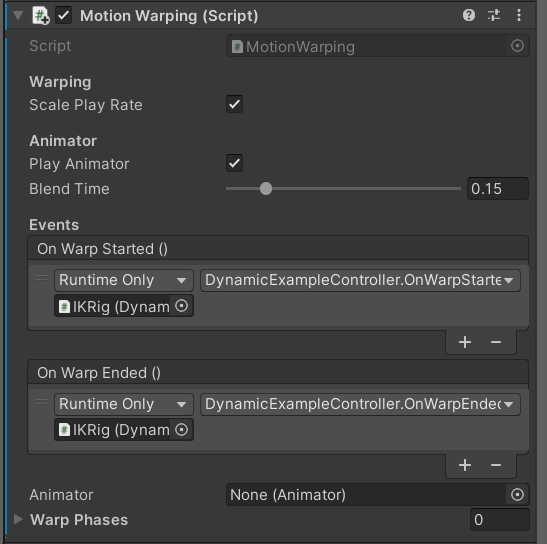
Interact method from your controller code whenever you want to start a warped interaction. It handles animation blending, play rate adjustment, and root motion offset application for the duration of the interaction.
Adding the Component
Add MotionWarping to your character’s root GameObject — the same object that owns theAnimator and the character’s movement controller. The component automatically locates the Animator on the same GameObject.
Component Properties
bool
default:"true"
When enabled, the system adjusts the Animator play rate for each warp phase based on the ratio between the actual target distance and the animation’s baked distance. This keeps motion looking natural when the real obstacle is larger or smaller than the animation assumed.Disable this if you want the animation to always play at 1× speed regardless of target distance, for example when distance differences are small enough to ignore.
bool
default:"true"
When enabled, the MotionWarping component automatically triggers the warped animation on the
Animator using the asset’s assigned clip. Disable this if your controller plays the animation itself and you only want the component to apply the root motion offset.float
default:"0.15"
The cross-fade duration (in seconds) used when transitioning into the warped animation state. A short blend time (0.1–0.2 s) produces a snappy transition suitable for reactive interactions like vaulting. Increase it for smoother blends on slower interactions like climbing.
UnityEvent
Fired immediately before the warped interaction begins. Use this event to disable any systems that would interfere with warping — for example, turning off the character controller’s gravity, disabling the movement state machine, or disabling the character’s collision so it can pass through the obstacle geometry cleanly.
UnityEvent
Fired immediately after the warped interaction finishes. Use this event to restore the systems you disabled in
OnWarpStarted — re-enable movement, restore gravity, or re-enable collision.Referencing the Component in Code
Your controller needs a reference to the MotionWarping component to trigger interactions. Retrieve it inStart using GetComponent:
Interact with a Warp Provider to start a warped animation. See the Warp Providers page for full usage examples.
Typical Event Wiring Pattern
A common pattern is to useOnWarpStarted and OnWarpEnded to gate your movement logic:
- OnWarpStarted → disable character controller input, disable gravity, disable hit detection.
- OnWarpEnded → re-enable movement input, restore gravity, re-enable hit detection.