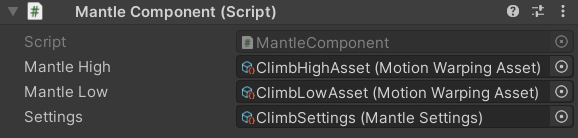
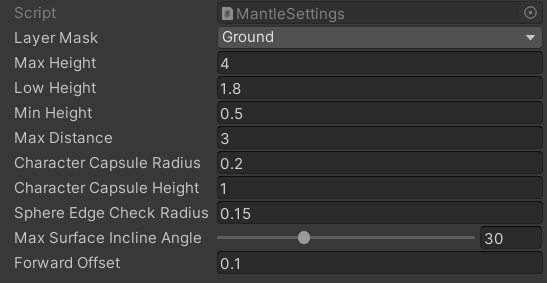
The Mantle Component gives your character the ability to climb over obstacles in the environment. It distinguishes between low and high obstacles automatically, playing the appropriate Motion Warping Asset for each case. Add the component directly to your character GameObject and supply a Settings Data Asset to control how the system detects climbable surfaces.

Add to Your Character

Attach the MantleComponent directly to your character GameObject in the Inspector. You will need to assign two Motion Warping Assets (one for high climbs, one for low climbs) and a Settings Data Asset that governs detection behaviour.
Create Mantle Settings and Motion Warping Assets by right-clicking in the Project window and choosing Create → KINEMATION → Motion Warping.

Component Properties

Motion Warping Asset
required
The Motion Warping Asset used when the character climbs a high obstacle. The system selects this asset when the detected obstacle height exceeds the Low Height threshold defined in the Settings Data Asset.
Motion Warping Asset
required
The Motion Warping Asset used when the character climbs a low obstacle. The system selects this asset when the detected obstacle height is at or below the Low Height threshold.
Data Asset
required
A reusable Scriptable Object that holds all detection and geometry parameters for the climbing logic. Configure it once and share it across multiple characters or scenarios.

Settings Data Asset Properties

LayerMask
required
Defines which collision layers the component considers when searching for a climbable obstacle. Set this to the layers that represent your environment geometry.
float
required
The maximum obstacle height the character can climb. If the detected obstacle is taller than this value, the climbing interaction is rejected and will not start.
float
required
The height threshold that determines which animation asset is used. If the obstacle height exceeds this value the system plays the Mantle High asset; otherwise it plays the Mantle Low asset.
float
required
The minimum obstacle height required to trigger a climb. Obstacles shorter than this value are ignored entirely.
float
required
The maximum horizontal distance allowed between the character and the obstacle. If the character is farther away than this value, the interaction is skipped.
float
required
The radius of the capsule shape used during the initial obstacle trace. Match this to your character’s approximate width for reliable detection. Also used to verify that enough space exists on the obstacle’s edge for the character to land.
float
required
The height of the capsule shape used during the initial obstacle trace and the space-check on the edge. Tune this to match the crouched or standing height of the character depending on your animation.
float
required
The radius of the sphere trace used to locate the precise edge of the obstacle. A smaller radius finds sharper edges; a larger radius tolerates rougher geometry.
float
required
The maximum angle (in degrees) that the top surface of an obstacle may be inclined before the system refuses to climb it. Use this to prevent the character from attempting to climb steep or sloped surfaces.
float
required
A distance offset applied forward from the detected edge point. Adjust this to fine-tune where the character lands after clearing the top of the obstacle.

How It Works

The MantleComponent runs three sequential stages every time you trigger an interaction. All three stages must succeed for the climb to begin.
1

Find the Obstacle

The component casts a capsule (using Capsule Radius, Capsule Height, and Max Distance) in front of the character to detect a potential obstacle. If nothing is hit within the allowed distance, the interaction is aborted immediately.
2

Find the Edge

A sphere trace (using Sphere Edge Check Radius) walks the hit geometry to locate the precise top edge of the obstacle. The detected height is validated against Min Height and Max Height. If the edge falls outside that range, the interaction is rejected.
3

Check Available Space

The component checks whether there is enough clearance on and above the edge for the character capsule. If another collider is blocking the landing zone, the interaction is cancelled.
If all three stages succeed, the system picks the correct Motion Warping Asset (High or Low) based on the Low Height threshold and starts the interaction.

Triggering the Interaction

Get a reference to the MantleComponent on your character, then call Interact on the MotionWarping component and pass the MantleComponent as the argument:
Call this from your input handler, animation state machine, or ability system whenever you want the character to attempt a climb.

Motion Warping Asset Requirements

Climbing moves the character from a starting position to a single destination point on top of the obstacle. Your Motion Warping Asset therefore needs exactly one Warp Phase.
Both the Mantle High and Mantle Low assets must each contain exactly 1 Warp Phase. The single phase maps the character’s root motion from its current position to the detected edge point.