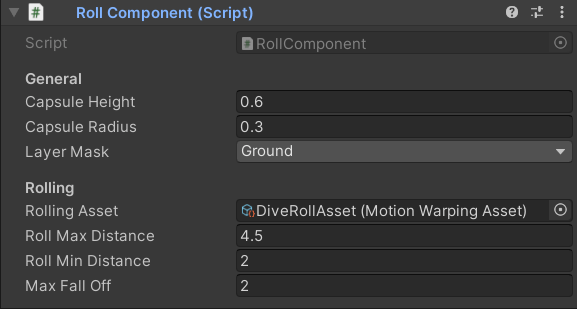
The Roll Component moves the character forward along the ground, making it ideal for sliding and rolling mechanics. Rather than playing a fixed-distance animation, it procedurally finds a target point ahead of the character based on the terrain and allowed distance range, then warps the animation to land precisely on that point. This means your rolls and slides adapt naturally to slopes, uneven ground, and varying movement speeds. Add this component directly to your character and configure it in the Inspector.

Add to Your Character

Attach the RollComponent directly to your character GameObject. All settings are exposed directly on the component — no separate Data Asset is required.

Component Properties

float
required
The height of the capsule shape used to check for blocking obstacles in the character’s path during the roll. Set this to a value appropriate for the character’s crouched silhouette during a slide or roll animation.
float
required
The radius of the capsule shape used to detect obstacles ahead of the character. Tune this to match the character’s width so the clearance check accurately represents the rolling pose.
LayerMask
required
Defines which collision layers the component tests against when checking for obstacles and when tracing down to find the target point. Set this to include your environment geometry layers.
Motion Warping Asset
required
The Motion Warping Asset containing the roll or slide animation to play. The single Warp Phase within this asset will be driven to the target point found by the component.
float
required
The maximum distance ahead the system will place the target point. The character will roll no farther than this distance in a single interaction.
float
required
The minimum distance ahead required for the target point. If no valid ground point exists at least this far ahead, the interaction is cancelled.
float
required
The maximum allowed vertical drop between the character’s current position and the target point. If the traced ground point is lower than the character by more than this value, the interaction is rejected — preventing rolls off ledges or into pits.

How It Works

The RollComponent executes two sequential trace stages before starting the interaction. Both stages must pass for the roll to proceed.
1

Check for Blocking Obstacles

The component sweeps a capsule (defined by Capsule Height and Capsule Radius) forward along the roll path. If any collider on the Layer Mask intersects the capsule, the interaction is immediately aborted — the character cannot roll into a space it doesn’t fit.
2

Trace Down for the Target Point

With the path confirmed clear, the component traces downward from a point ahead of the character (within Roll Max Distance) to find the ground surface. The hit position is validated against Roll Min Distance and Max Fall Off. If no ground hit is found, or if the hit falls outside the allowed range, the interaction is cancelled.
If both stages succeed, the system initiates the roll interaction and warps the character to the detected target point using the Rolling Asset.

Triggering the Interaction

Get a reference to the RollComponent on your character, then call Interact on the MotionWarping component:
Call this from your input handler, movement state machine, or ability system when the player triggers a slide or roll action.

Motion Warping Asset Requirements

Rolling or sliding moves the character from its current position to a single point ahead on the ground, so the Rolling Asset requires exactly one Warp Phase.
The single Warp Phase maps the character’s root motion forward to the ground point discovered by the downward trace. Ensure your roll or slide animation’s root motion aligns with this forward direction for best results.