The Vault Component enables your character to dynamically vault over obstacles — rails, walls, boxes, and other geometry — regardless of their exact width or height. It locates three key spatial points on the obstacle (Close Edge, Far Edge, and End Point) and uses three consecutive Warp Phases to smoothly carry the character over. Add the component directly to your character GameObject and provide a Vaulting Settings Data Asset.

Add to Your Character

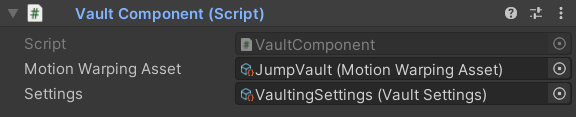
Attach the VaultComponent directly to your character GameObject. Assign a Vault Motion Warping Asset and a Vaulting Settings Data Asset in the Inspector.
Create Vaulting Settings and Motion Warping Assets by right-clicking in the Project window and choosing Create → KINEMATION → Motion Warping.

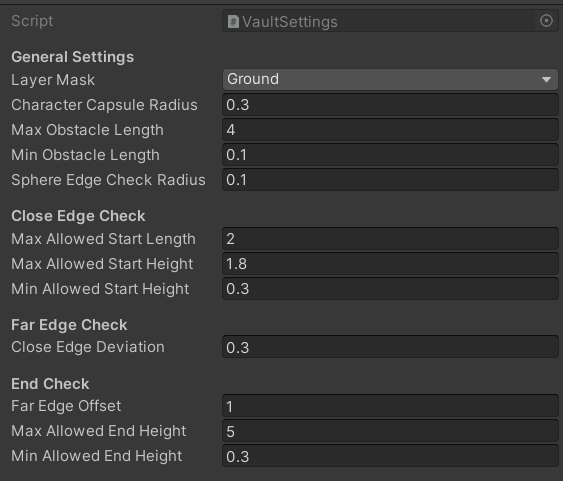
Vaulting Settings Properties

LayerMask
required
Defines which collision layers the component scans when searching for vaultable obstacles. Set this to the layers containing your environment geometry.
float
required
The radius of the capsule trace used to detect the obstacle in front of the character. Match this value to the character’s approximate body width.
float
required
The maximum allowed length (depth) of the obstacle from close edge to far edge. Obstacles longer than this value will not be vaulted.
float
required
The minimum allowed length (depth) of the obstacle. Obstacles shorter than this value will not be vaulted.
float
required
The radius of the sphere trace used to find both the close and far edges of the obstacle. A smaller radius pinpoints sharper edges; a larger radius handles rougher geometry better.
float
required
The maximum horizontal distance permitted between the character and the close edge of the obstacle. If the character is farther away than this value, the vault is not triggered.
float
required
The maximum height of the close (front) edge. If the close edge is higher than this value, the vault is rejected.
float
required
The minimum height of the close (front) edge. If the close edge is lower than this value, the vault is rejected.
float
required
A vertical offset applied to the detected close edge point. Use this to raise or lower where the character’s hands or feet contact the near side of the obstacle during the animation.
float
required
A vertical start offset applied when searching for the far (rear) edge of the obstacle. Adjust this to ensure the sphere trace begins at the right height for your geometry.
float
required
The maximum height of the far (rear) edge. Obstacles whose far side is higher than this value will not be vaulted.
float
required
The minimum height of the far (rear) edge. Obstacles whose far side is lower than this value will not be vaulted.

How It Works

The VaultComponent runs three sequential detection stages to locate all the spatial data the Warp Phases need. Every stage must succeed for the vault to begin.
1

Find the Close Edge

The component casts a capsule in front of the character and uses a sphere trace to locate the Close Edge — the near top edge of the obstacle. The result is validated against Max/Min Allowed Start Height and Max Allowed Start Length. If the close edge falls outside the allowed range, the vault is aborted.
2

Find the End Point

Using the close edge as a reference, the component calculates the End Point — the position on the ground where the character will land after clearing the obstacle. The obstacle length between close and far edges is compared against Max/Min Obstacle Length.
3

Find the Far Edge

A sphere trace (offset by Far Edge Offset) locates the Far Edge — the rear top edge of the obstacle. The detected height is validated against Max/Min Allowed End Height. If the far edge is out of range, the vault is cancelled.
If all three stages succeed, the system initiates the interaction and drives the character through the three Warp Phases.

Triggering the Interaction

Get a reference to the VaultComponent on your character, then call Interact on the MotionWarping component:
Invoke this from your input handler or movement system when the character approaches a vaultable obstacle.

Motion Warping Asset Requirements

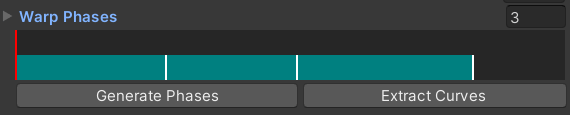
Vaulting involves three distinct spatial transitions, so your Motion Warping Asset must contain exactly three Warp Phases:
1

Phase 1 — Approach

Warps the character from its current position to the Close Edge. This phase covers the run-up and the moment the character’s hands or feet first contact the obstacle.
2

Phase 2 — Clear

Warps the character from the Close Edge to the Far Edge. This phase spans the airborne or supported portion of the vault above the obstacle.
3

Phase 3 — Land

Warps the character from the Far Edge to the End Point. This phase covers the descent and landing on the far side of the obstacle.
The order and count of Warp Phases is fixed. The system maps Phase 1 → Close Edge, Phase 2 → Far Edge, and Phase 3 → End Point automatically based on the points found during detection.