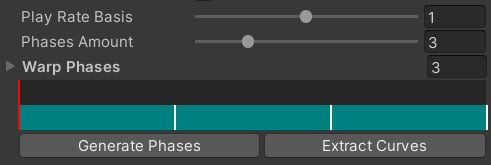
Warping Phases are segments of the animation, where we want to perfrorm warping. In our plugin, these are purple draggable windows found in the Motion Warping Asset:
Vaulting animation example.
The example above is a vaulting animation that has 3 warping windows. But why 3? The amount of warping windows depends on the number of target points we are going to provide. To vault over an object, we must know:
Front obstacle edge point
Rear obstacle edge point
Landing point
This makes it 3 warping points, which gives us 3 animation segments.
Another example: climbing animation - we only need a single warp phase, because we want to go from the current character position to the obstacle top point.
Warping Phases also contain useful information about the animation segment, such as:
Target point position and rotation offset
Segment play rate controls
Segment start and end time
T and R Offsets are used to offset the target point of the segment. This is super useful since the system will always align the character root with the target point. You can also use this to fix awkward poses, caused by the original animation.Min and Max playrate define the play rate limitations. You will find out more about the play rate in the next chapter.
When warping animations, we might run into a situation when the obstacle is simply too long. If we keep the play rate the same, it will look strange, as if the character has an insane momentum.To fix this, our plugin scales the play rate for the current animation phase. This is done by computing the vector length difference.
Example: if the obstacle is 1m away, and our animation was made for a 0.5m obstacle, the play rate will be scaled down twice: from 1 to 0.5. If it was 0.25m away, the play rate will be increased from 1 to 2.
You can adjust the play rate for any segment manually by editing the respective values:The play rate is finally applied in the Animator Controller via a float parameter:If you have a custom animation system, you will need to find a way to manually plug in the adjusted play rate value.
Every Warping Phase contains accumulated root motion for each translation axis.
Tip: the total root motion is refreshed when you re-open the motion warping asset.
But why is it important? This feature is used to preserve the original motion. This is crucial for proper warping, and you will find out more in the next chapter.
Animations are warped in the **LateUpdate()**, right after the Animator update. This allows to completely take over the character root motion, and preserve the previously applied IK and constraints.To warp the motion, we must know the difference between the original animation and the desired target point. Let’s use a climbing animation curve as an example:
Climbing animation curve
This curve offsets the character’s vertical position by ~3 meters. The Total Root Motion will be ~3, as it’s the final offset.In runtime, when our animation is playing, the system will accumulate animation translation deltas, and divide them by the Total Root Motion.
Example: let’s say our animation was made for climbing a 3-meter obstacle. The object we want to climb is 6 meters, and we desire to warp. The height delta is 3 meters, so we need to add it to the current root motion, using total root motion:Formula: offset = desiredHeightDelta * accumulatedRootMotion / totalRootMotion,where (accumulatedRootMotion / totalRootMotion) is in the range [0;1] and acts as an alpha or weight.
After that, Motion Warping will apply the offset to the current position.
Note: rotation warping is slightly different. Instead of using Total Root Motion, rotations are simply SLERP’ed based on the current Warp Phase normalized time:rotation = Quaternion.Slerp(startRotation, targetRotation, normalizedTime).
In the next section, you will be able to apply this knowledge in practice! If you have any questions about the system, feel free to join our Discord community.