Installing CAS
Character Animation System is available on the Unity Asset Store. Follow these steps to import the asset to your project:Content
Once the package is imported, you will see a “KINEMATION” folder: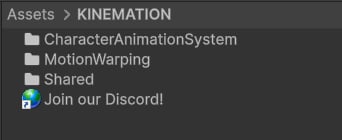
- KAnimationCore: A library that provides a foundation for all animation logic.
- PropertyBindings: A system that binds properties in the editor without any code.
- ScriptableWidget: An editor widget used to display procedural animation modifiers.
- Character: Kinemation Mannequin model.
MotionWarping handles the climbing. You can learn more about it here. CharacterAnimationSystem contains scripts and example content:
- Examples: Includes Animator Controller template and example scripts (e.g., character controller).
- Scripts: Includes all CAS main animation logic — from layered blending to procedural modifiers.