CAS provides three lightweight utility modifiers for manipulating bone transforms within the procedural stack: Copy Bone transfers a transform from one bone to another, Modify Bone applies a position, rotation, or scale offset to a single bone, and Modify Bone Chain applies those same offsets to an entire chain of bones at once. Together they form the foundation of IK proxy setups and runtime procedural corrections.

Copy Bone

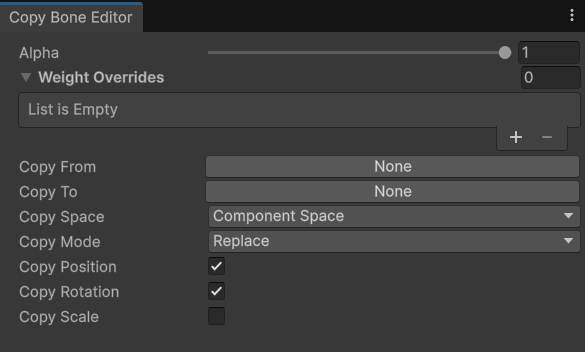
Copy Bone reads the transform of one bone and writes it to another each frame. It is the essential first step in any IK proxy workflow — you copy the animated hand or foot pose into an IK target bone so that downstream modifiers can reposition that target without disturbing the source bone.

Properties

KRigElement
The source bone whose transform will be read. This is typically the real animated bone, such as hand_r or foot_l.
KRigElement
The destination bone that will receive the copied transform. This is typically an IK proxy bone, such as IK hand_r or IK foot_l.
enum
Determines how the copied transform is applied to the destination:
  • Replace — overwrites the destination transform with the source transform.
  • Add — accumulates the source transform on top of the existing destination transform.
bool
default:"true"
When enabled, copies the source bone’s local position to the destination.
bool
default:"true"
When enabled, copies the source bone’s local rotation to the destination.
bool
default:"true"
When enabled, copies the source bone’s local scale to the destination.

IK Proxy Setup Pattern

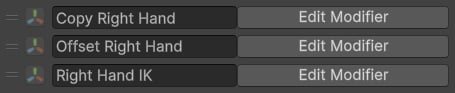
The typical CAS pattern for IK setups uses Copy Bone as the first step in a three-modifier chain:
1

Copy Bone — initialise the IK target

Copy the animated bone (e.g., foot_r) to its corresponding IK proxy bone (e.g., IK foot_r). The IK target now holds the current animation pose.
2

Modify the IK target procedurally

Let intermediate modifiers — Foot IK, Step Modifier, or a Modify Bone — reposition the IK proxy to its corrected world position.
3

Two Bone IK — drive the real limb

Use a Two Bone IK modifier to solve the limb chain so the real hand or foot bone reaches the adjusted IK proxy position.
This workflow caches the animation pose in an IK proxy and modifies only that proxy, preserving the original character pose on all other bones.

Modify Bone

Modify Bone directly changes the position, rotation, or scale of a single bone at runtime. Unlike Copy Bone, which reads from another bone, Modify Bone accepts externally bound values — for example, a recoil offset from a weapon system or a procedural translation from a character controller.

Properties

KRigElement
The bone whose transform will be modified.
Vector3 property binding
The position offset or absolute position to apply. You can bind any Vector3 value from your runtime components to this property using Property Bindings.
Quaternion property binding
The rotation offset or absolute rotation to apply. Bind any Quaternion value from your runtime components.
Vector3 property binding
The scale offset or absolute scale to apply. Bind any Vector3 value from your runtime components.
enum
The coordinate space in which the position or rotation offset is applied — local bone space, character space, or world space.
enum
Controls whether the modifier ignores, adds to, or replaces the existing bone transform for each channel independently.

Use Cases

  • Recoil and sway — bind a weapon component’s recoil vector to Position to procedurally shake the weapon bone without animation curves.
  • IK target nudging — add a translation offset to an IK proxy bone after Copy Bone and before Two Bone IK.
  • Debug posing — temporarily override a bone’s transform in the editor to test IK or modifier configurations.

Modify Bone Chain

Modify Bone Chain works identically to Modify Bone but applies the offset to every bone in a specified chain simultaneously. This is efficient when you want the same rotation or translation applied uniformly across a set of adjacent bones — for example, curling all finger bones together, or tilting an entire spine chain.

Properties

KRigElement[]
The list of bones that will all receive the same offset. Drag in any contiguous or non-contiguous set of bones.
Vector3 property binding
The translation offset applied to every bone in the chain. Bind to any runtime Vector3 value.
Quaternion property binding
The rotation offset applied to every bone in the chain. Bind to any runtime Quaternion value.
enum
The coordinate space in which the offsets are applied — local, component, or world.
enum
Whether the offset adds to or replaces the current transform on each bone.

Use Cases

  • Trigger discipline — rotate all index finger bones 45° around the local Z axis when the character is sprinting, so the finger lifts off the trigger. This is the example used in the CAS FPS Add-on.
  • Spine curl or lean — tilt the entire spine chain forward during a sprint without authoring a separate animation layer.
  • Bulk finger posing — shape a hand grip by rotating multiple finger bones to a target angle simultaneously.
Use Modify Bone Chain instead of multiple individual Modify Bone entries whenever the same offset should apply to a group of bones. It keeps the modifier stack shorter and is more performant than stacking many single-bone modifiers.