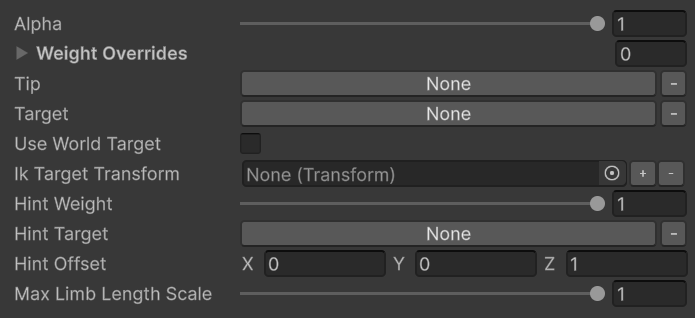
Properties
KRigElement
The terminal bone of the chain — the bone that must reach the target. For arms this is the hand; for legs this is the foot.
KRigElement
The bone or transform the Tip should reach. This is typically an IK proxy bone (
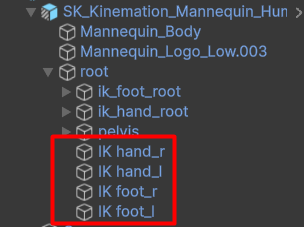
IK hand_r, IK foot_l, etc.) that upstream modifiers have already positioned.bool
default:"false"
When enabled, the modifier reads IK Target Transform as a world-space position and rotation instead of looking up a bone in the skeleton. Enable this when you want to drive IK from an arbitrary scene object.
Transform
A world-space
Transform used as the IK target when Use World Target is enabled. Assign a scene GameObject — for example, a grab point on a prop.float
default:"1"
Controls how strongly the Pole Target pulls the middle joint (elbow or knee) in its direction. Lower this value if the pole is producing unnatural bending.
KRigElement
The hint or pole bone that determines which way the middle joint bends. For arms this is an elbow hint; for legs this is a knee hint.
Vector3
A local-space position offset applied on top of the Pole Target bone position. Use this to nudge the pole direction without moving the pole bone itself.
float
default:"1"
The maximum allowed limb length multiplier. Values above
1 let the solver stretch the limb slightly to reach distant targets; keep at 1 for non-stretchy limbs.Proxy-Bone Workflow
Most Two Bone IK setups in CAS follow a three-stage pattern:1
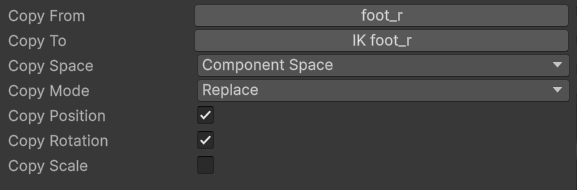
Copy real bone to IK target
Use a Copy Bone modifier to copy the animated hand or foot pose into the corresponding IK proxy bone. This seeds the IK target with the current animation pose.
2
Apply procedural corrections to the IK target
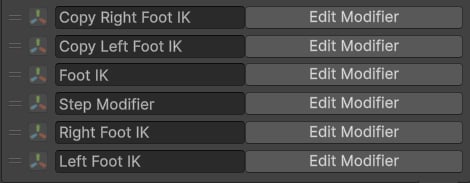
Let upstream modifiers — Foot IK, Step Modifier, or your own custom logic — move and rotate the IK proxy bone to its corrected world position.
3
Solve with Two Bone IK
The Two Bone IK modifier reads the final IK proxy position and solves the limb chain so the Tip bone arrives there. The original animation pose is preserved on all other bones.
Use Cases
- Foot planting on terrain — combine with Foot IK to move the foot IK target to the surface hit point, then use Two Bone IK to drive the leg to that position.
- Hand-to-prop attachment — attach a character’s hand to a door handle, ladder rung, or lever by setting an in-world Transform as the IK Target Transform.
- Procedural stepping — work alongside the Step Modifier to reposition the foot IK target during transitions and have Two Bone IK follow through.
- Left-hand weapon grip — place the left hand IK target on the weapon’s foregrip point and drive it with Two Bone IK for an always-correct two-handed weapon hold.
The Pole Target (hint or knee bone) is optional but strongly recommended. Without it the solver picks a default bend direction that may flip unpredictably when the limb crosses certain angles.