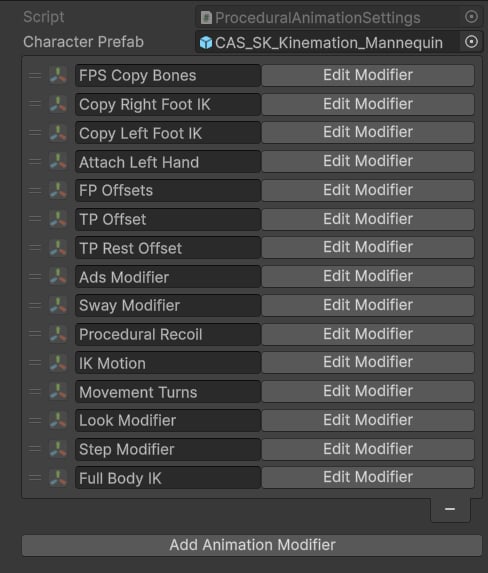
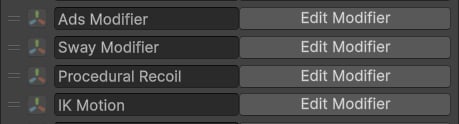
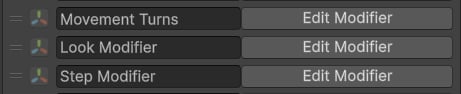
After the FPS preset runs, it creates a PA_ ScriptableObject in the same folder as your character assets. This Procedural Animation Settings asset is the central configuration file for every runtime procedural feature your FPS character uses. It holds an ordered list of modifiers that CAS evaluates top-to-bottom each frame. The order of that list is not cosmetic — it determines cause and effect. Moving a modifier above or below another changes what data it receives and therefore what the final animation looks like.

The three-stage structure

Every FPS Procedural Animation Settings asset is logically divided into three stages. CAS does not enforce this division automatically; it is a convention that the preset follows and that you should maintain when adding your own modifiers.
This structure preserves the original Animator pose throughout — the IK seeds are taken from the Animator output, procedural features are layered on top of those seeds, and the IK solvers finally drive the actual skeleton bones to match the IK targets.

Stage 1 — Animating IK bones

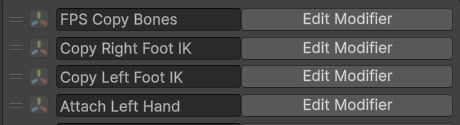
The first group of modifiers reads the current Animator pose and writes the relevant transforms into the IK target GameObjects so that downstream modifiers have accurate starting positions.

FPS Copy Bones

FPS Copy Bones is always the first modifier in the list. It copies animated pose data from the real skeleton bones into the weapon and hand IK targets. Specifically it reads IK weapon_bone_r (weapon pose relative to the right hand) and both hand bones, then writes them into IK weapon_bone, IK weapon_bone_aim, IK hand_r, and IK hand_l. All subsequent modifiers that touch the weapon or hands operate on data seeded by this step.

Copy Foot IK

Two Copy Bone modifiers follow — one for each foot. They copy the world position and rotation of the right and left foot bones from the Animator output into IK foot_r and IK foot_l respectively. The leg IK solvers at the end of the chain use these targets.

Attach Left Hand

Attach Left Hand resolves the left-hand grip pose. It checks the currently equipped weapon for a custom Attach Transform and Hand Pose clip. If a custom grip exists it overrides the default left-hand IK target with the weapon-specific pose; otherwise it falls back to IK hand_l_r (the left-hand pose relative to the right hand). This modifier must run after FPS Copy Bones because it depends on the IK targets already being seeded.

Stage 2 — Applying procedural features

Offsets

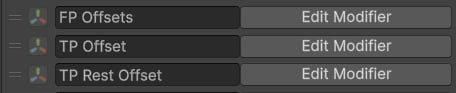
Three offset modifiers position the weapon and hands for different gameplay perspectives. All three are based on FPS Copy Bones and modify IK weapon_bone, IK weapon_bone_aim, IK hand_r, and IK hand_l.
Modifier
Positions the weapon and hands in first-person view. Bind per-weapon offset values from a weapon data ScriptableObject, the weapon prefab, or your character controller.
Modifier
Positions the weapon and hands when the player is in third-person view.
Modifier
Applied when the player is in third-person view and is not aiming. Typically lowers the weapon to a rest or low-ready pose.

Weight Overrides

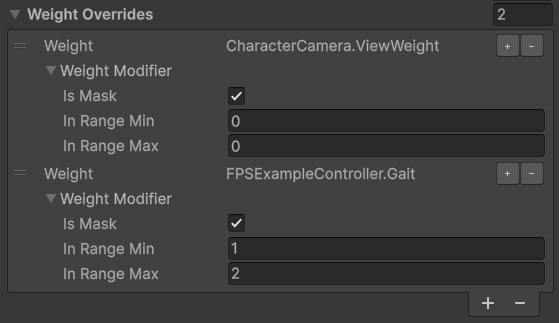
Weight Overrides lets you control the influence of any modifier dynamically at runtime. In the FPS Add-on demo it activates different offset modifiers depending on the aiming state and the active camera perspective — for example, the FP Offsets modifier is enabled only when the player is in first-person view. Use Weight Overrides to switch between gameplay states without duplicating modifier stacks or using separate Settings assets.
The ADS Modifier is placed before Sway and Recoil in Stage 2. This ordering is intentional — ADS sets the weapon’s aimed position first, and then Sway and Recoil layer their effects on top of the already-aimed pose.

FPS features

Modifier
Procedurally aligns the weapon’s aim point with the camera. It can operate in absolute mode (always perfectly aligned) or additive mode (preserves animation but nudges the weapon toward alignment). Place this before Sway and Recoil.
Modifier
Applies spring-based translational and angular sway driven by the player’s look delta input and movement direction. The spring parameters (damping, stiffness, speed, scale) are tunable per-weapon. Supports an optional additive bone for layer curve animations, and scales all effects down when the player is aiming.
Modifier
Drives firing animation using a RecoilAnimData asset. It applies pitch/roll/yaw random ranges, a continuous noise layer, and a first-shot pushback layer. Connect it via a Modify Bone modifier bound to the OutRot and OutLoc properties exposed by the Recoil Animation component.
Modifier
Plays additive transition animations on IK bones. Used for draw, holster, and aiming motions. Each IK Motion instance has its own rotation/translation curves, blend time, and play rate. Call UpdateAnimationModifier at runtime to trigger a specific motion.

Stage 3 — IK modifiers

The final stage solves inverse kinematics. The preset adds either four Two Bone IK modifiers (right arm, left arm, right leg, left leg) or a single Full Body IK modifier, depending on the character’s needs. These solvers read the IK target GameObjects that were seeded and modified by Stages 1 and 2, then rotate the actual arm and leg bones to reach those targets.
Weapon Collision is typically placed after the Look Modifier and after the IK modifiers, so it has access to the final arm poses when calculating whether to push the weapon back.

General modifiers

The FPS preset also includes three general-purpose CAS modifiers that are not FPS-specific but are important for the overall character feel:
Pivot Modifier
Adds a leaning tilt to the character when moving. This is the CAS Pivot Modifier, which rotates a spine or pelvis bone in the direction of travel to simulate a natural body lean.
Modifier
Applies the camera’s look rotation to the upper body and handles turn-in-place animations. This modifier is what makes the character’s spine and head follow the camera vertically.
Modifier
Plays procedural step animations to prevent foot sliding during locomotion. It detects ground contact and adjusts foot positions using the foot IK targets seeded in Stage 1.