
Overview
An Animation Modifier is a procedural feature that runs on top of the current animation pose and modifies selected bones at runtime. Modifiers are used to add dynamic behavior that would be difficult or inefficient to author as fixed animation clips. For example, they can adjust the spine for leaning, rotate the weapon bones for aiming, align the feet to the ground, or apply recoil offsets. Modifiers reside in the Procedural Animation Settings and are displayed as a list. You can add multiple modifiers of the same type to the settings: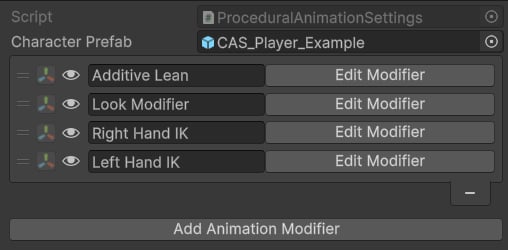
Animation Modifiers.
- Settings: a ScriptableObject that contains data (e.g., bone references).
- Animation Job: a runtime-only struct that executes the logic (e.g., applies inverse kinematics).
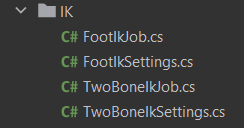
IK modifiers example.
Modifier reference
Choose a modifier to see its setup, settings, and common use cases.Copy Bone
Aim At
Foot IK
Full Body IK
Look Modifier
Modify Bone
Modify Bone Chain
Pivot Modifier
Stabilize Bone
Step Modifier
Stride Modifier
Two Bone IK
Weight Overrides
This feature provides more granular control over how modifiers are applied at runtime, using custom float properties: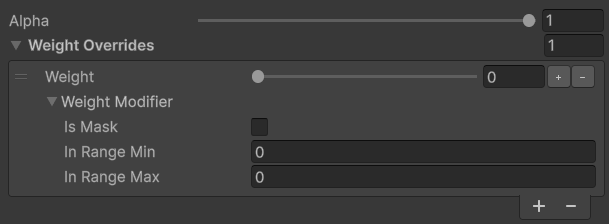
Weight Override.
- Weight — a float property to control the influence of this modifier.
- Is Mask — if enabled, the final value is computed as
1f - Weight. - In Range Min and Max — used to remap the Weight value. For example, if the Weight value is in a range other than [0, 1], specify the min and max values of the Weight range.
Animation Modifier Settings
AnimationModifierSettings is a base class for all modifier settings in the system:Inheritance and Interfaces
Inheritance and Interfaces
- IRigProvider: This interface is used to provide a skeleton hierarchy for editor widgets (e.g., bone or bone chain selection).
- IBindableContext: This interface provides a GameObject context for https://kinemation.gitbook.io/character-animation-system-docs/character-animation-system/property-bindings.
Fields
Fields
- characterPrefab: A reference to the player prefab.
- alpha: A value that controls the influence of this modifier.
- weightOverrides: Additional float parameters to adjust alpha at runtime. This section is useful when multiple values should affect the influence of a modifier (e.g., blending it out when playing a specific animation).
Methods
Methods
- InitializeOnLoad(): Called when the game starts. This callback is used to build Property Bindings.
- CreateAnimationJob(): Called when Procedural Animation Settings are initialized and returns an instance of an Animation Job that executes the logic.
- GetContext(): Returns a context GameObject for Property Bindings.
- GetHierarchy(): Returns an array of all bones in the skeleton.
Note: Animation Jobs run their logic on the animation thread, so modifying their data at runtime may result in unexpected behaviors.
Animation Modifier Job
An Animation Modifier Job is a struct that executes animation logic. All jobs in the Character Animation System implement 2 interfaces:- IAnimationJob: an interface provided by Unity’s Playables API.
- IAnimationModifierJob: an interface provided by the Character Animation System.
IAnimationModifierJob
IAnimationModifierJob