
Overview
Step Modifier creates procedural steps to avoid feet sliding when changing animation states (e.g., standing to crouching).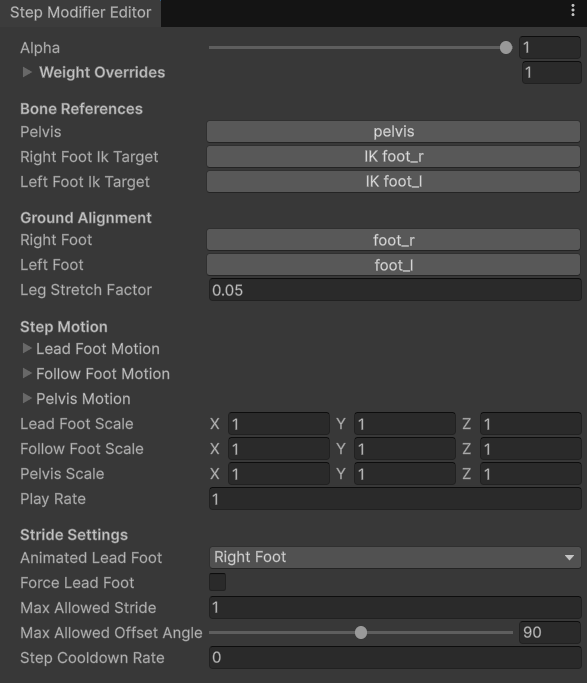
Bone References
Here you will find bone references to assign.
- Pelvis — pelvis or hip bone.
- Right and Left Foot IK Target — IK bone for the right or left foot. It’s usually set to IK foot_r or IK foot_l.
Ground Alignment
Here you will find settings for snapping feet to the ground.
- Right Foot — right foot bone (not an IK).
- Left Foot — left foot bone (not an IK).
- Leg Stretch Factor — fine-tunes how aggressively the system detects and corrects leg stretching. Higher values increase the likelihood that a leg will be classified as “stretched” and have its length adjusted accordingly.
Step Motion
Here you will find animation curves for feet and pelvis.
- Lead Foot Motion — position animation for the leading foot (the one making a step first).
- Follow Foot Motion — position animation for the following foot (the one making a step after the leading one).
- Pelvis Motion — position animation for pelvis.
Note: The Animation Curve values must at end zero for all motions.
- Lead, Follow Foot and Pelvis Scale — values that will scale each motion per-axis. For example, the X component will scale the X axis.
- Play Rate — speed multiplier for this step motion.
Stride Settings
Here you will properties that define the procedural step.
- Animated Lead Foot — defines the leading foot for this step. A leading foot is the one making a step first.
- Force Lead Foot — controls if the step must always start with a leading foot. If disabled, the leading foot will be determined based on the velocity vector.
- Max Allowed Strength — defines the max allowed step length. If exceeded, feet will be moved in the movement direction to avoid stretching.
- Max Allowed Offset Angle — defines the max allowed character rotation to avoid leg twisting. If exceeded, feet will be rotated around pelvis to compensate the rotation.
- Step Cooldown Rate — time in seconds needed to pass before making the next step.
Use-cases
Step Modifier can be used for any situation to replace feet sliding with a nice procedural step. Here are most popular applications:- Movement stop or start transitions.
- New stance transition (e.g., going from rifle to sword, or from standing to crouching).
- Turning in place.
Recommended settings
To get best results, make sure that:- MaxAllowedStride is set to ~0.3-0.4 to avoid character legs being strecthed. Setting this to a too small number will result in abrupt, unnatural steps.
- MaxAllowedOffsetAngle is set to ~45 degrees to avoid legs being twisted.
- StepCooldownRate is set to ~0.3-0.4s to handle player input-spamming situations.
- Force Lead Foot can be used for specific cases, like turning in place — we only want to turn right with the right foot, and vice versa.
- All animation curves start at zero for a seamless transition.
How to play steps
Steps can be played at runtime using by updating the animation modifier:YourComponent.cs
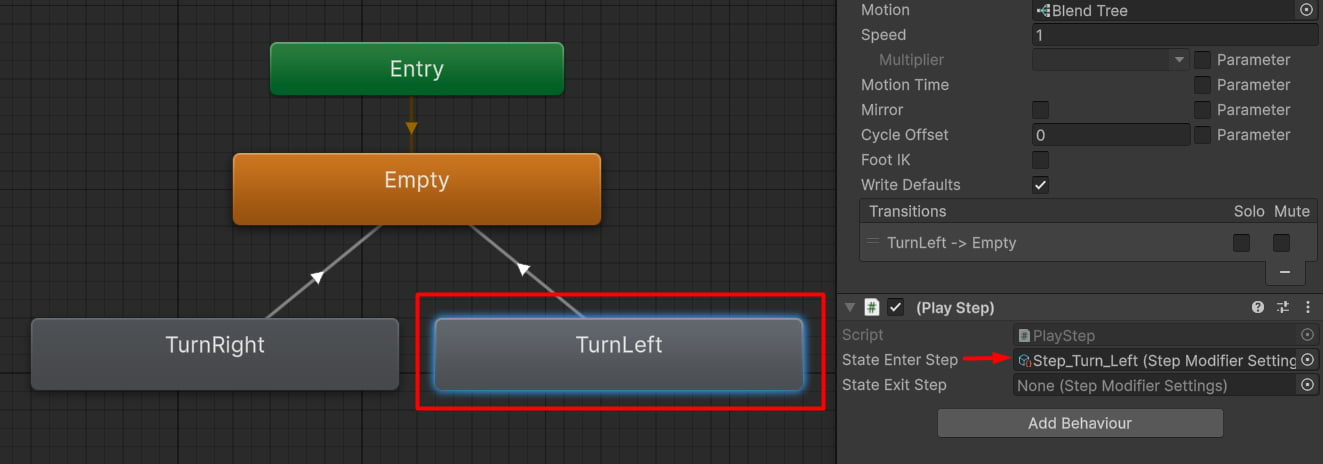
Syncing steps with animation states.