
Overview
Stabilize Bone modifier dynamically selects and stabilizes a bone position in component space, keeping it fixed relative to the character’s current stance.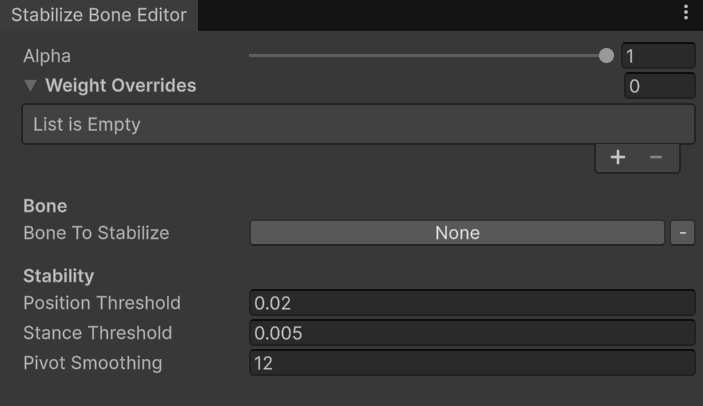
Stabilize Bone properties.
- Bone to Stabilize — the bone that will be stabilized at runtime.
- Position Threshold — if the bone’s translation delta exceeds this value, stabilization is temporarily disabled while the modifier searches for a new stable stance.
- Stance Threshold — if the bone’s translation delta falls below this value, the bone is locked in component space.
- Pivot Smoothing — controls the interpolation speed used to smooth changes in the stabilized position.
Use-cases
The modifier searches for a stable stance using the Stance Threshold. When the bone’s positional delta falls below this value, the bone is locked in component space and stabilized. If the bone’s positional delta exceeds the Position Threshold — for example, when the character stands up or crouches — stabilization is temporarily disabled. The modifier then waits until the bone settles into a new stable stance before locking it again.Tip: Full-body locomotion naturally produces noticeable head bobbing. This is mainly caused by vertical pelvis translation during walking, jogging, and sprinting.
- It looks for a stable stance using Stance Threshold — if the bone position delta is less than this value, the bone will be locked in component space and therefore stabilized.
- If the bone position exceeds Position Threshold — e.g., character stands up or crouches — the stabilization will be disabled until a new Stance Threshold is settled in.
- Bone To Stabilize — pelvis or root spine bone.
- Position Threshold — 0.3f.
- Stance Threshold — 0.005f.